Instruments by Science Group
 Macromolecular
 Soft Condensed
  Imaging and
 Biological
 Magnetic
 Structures and
 Crystallography
  Spectroscopy
 I03 Contact
Beamline Phone Number:
+44 (0) 1235 778707
Acting Principal Beamline Scientist:
Dave Hall
Tel: +44 (0) 1235 778926
E-mail: [email protected]
Science Group Leader
Dave Hall
Email: [email protected]
Tel: +44 (0) 1235 778926
I03 MX
Status: Operational
Beamsize: 90 µm x 20 µm
Detector: Eiger2 XE 16M
Wavelength: 0.50 - 2.07 Å
Energy: 6 - 25 keV
Detector: Eiger2 XE 16M
Wavelength: 0.50 - 2.07 Å
Energy: 6 - 25 keV
Using X-ray grid scans to automatically centre your sample
You can use grid scans to automatically centre your sample. This method is very successful, even with LCP or ice covered crystals.
Manually triggered automatic X-Ray centring
For an already mounted sample, you can manually trigger X-Ray centring as follows:
- First, make sure your loop is roughly centred in the field of view.
- Click the X-Ray button on the Align tab of the Alignment view in GDA.
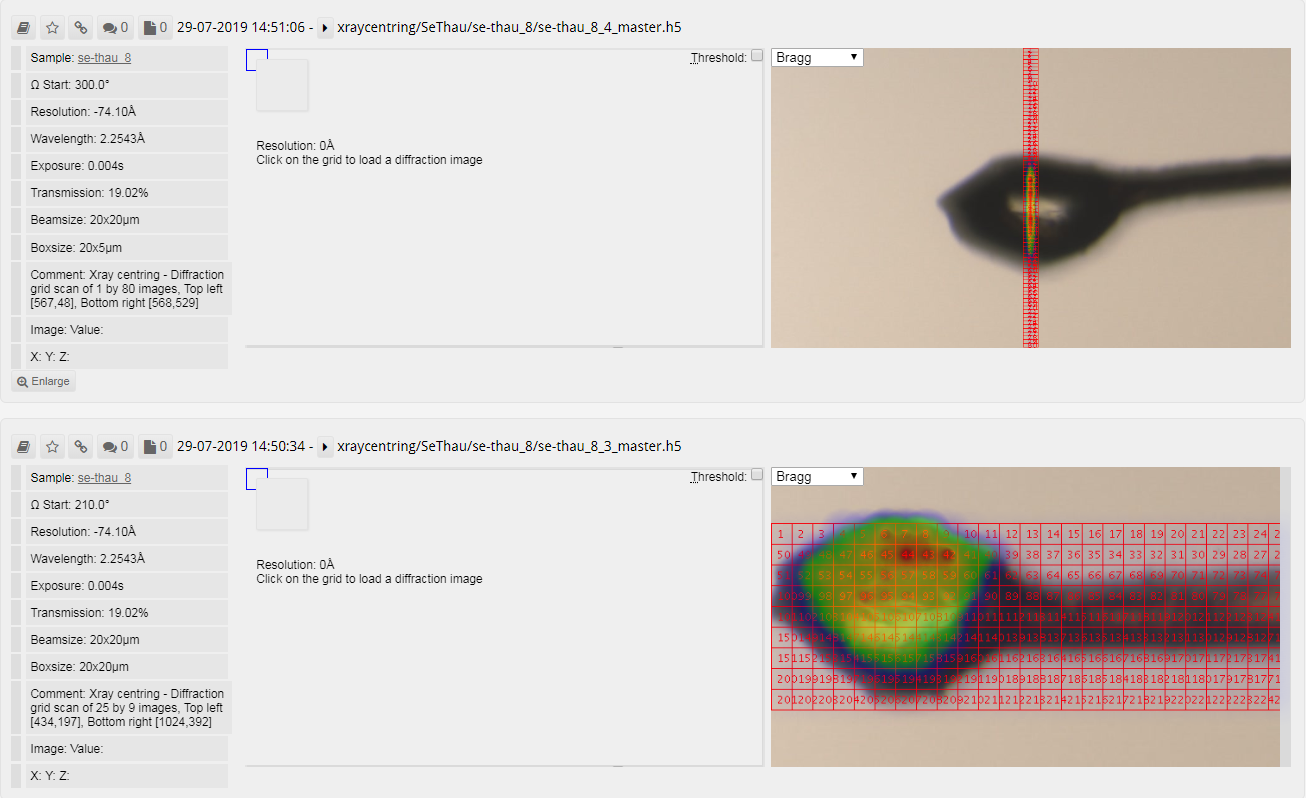
The X-Ray centring process will take approximately 50s and you can view the grid scans via Synchweb. Bear in mind that the scoring results displayed in Synchweb do not reflect those from the automated X-Ray centring process, which is configured to avoid salt and ice related diffraction.
Automatic X-Ray centring as part of a data collection or screening operation
It is possible to request X-Ray centring when driving data collections for each new robot loaded sample. You can do this as follows:
- Configure your desired data collection or screening settings from the Data Collection perspective.
- Click the Sample ID (Select Samples and Run for screening) and choose the samples you want to collect with these settings.
- At the bottom of the sample selection popup, make sure you choose the Auto X-Ray radio button as shown below.
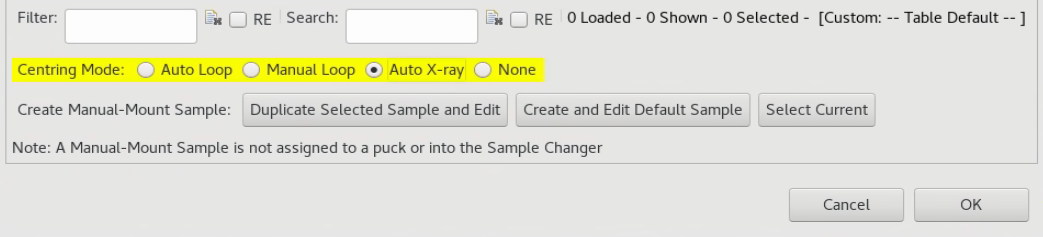
- For a Screening queue, clicking OK will start the queue automatically and X-Ray centre each new loaded sample prior to collecting screening images.
- For a Data Collection, clicking OK will populate the Data Collection Input Table with a separate row for each sample. You can now choose Run All from the top of the form to collect every sample.
- X-Ray centring triggered in this fashion will only operate on a fresh sample load so don't load the first sample manually before starting the queue.
How it works
If you now load your sample, the routine puts the loop at the crosshair (Keyence Centring) and performs Loop centring to make sure the sample is in focus at all omega angles.
It then automatically carries out a two-dimensional grid scan covering the whole height of any object in view and extending from the furthermost tip to the edge of the visible image. This covers the entire loop and any protruding crystals and extends back along the neck towards the pin (we quite often find crystals along the neck of the loop). These grid scans use a smaller area of the detector for speed of processing and the beam size and exposure settings to be used are set by the beamline staff.
Each image from this grid scan is scored by the number of Bragg candidates using data to 5Å and the centre of mass is calculated from the results. The motors drive this position to the crosshair.
Afterwards, a finer, linear grid scan is performed perpendicularly to the two-dimensional one at the position where the crystal diffracts best. This is scored in the same fashion as before and again the best point is driven to the crosshair. The crystal is now centred.
At this point. data collection is automatically started. The whole process from loading the sample to the end of a 360 degree data collection with standard parameters takes approximately 2.0 min.

Diamond Light Source is the UK's national synchrotron science facility, located at the Harwell Science and Innovation Campus in Oxfordshire.
Diamond Light Source Ltd
Diamond House
Harwell Science & Innovation Campus
Didcot
Oxfordshire
OX11 0DE
Copyright © Diamond Light Source. Diamond Light Source® and the Diamond logo are registered trademarks of Diamond Light Source Ltd
Registered in England and Wales at Diamond House, Harwell Science and Innovation Campus, Didcot, Oxfordshire, OX11 0DE, United Kingdom. Company number: 4375679. VAT number: 287 461 957. Economic Operators Registration and Identification (EORI) number: GB287461957003.