 Macromolecular
 Soft Condensed
  Imaging and
 Biological
 Magnetic
 Structures and
 Crystallography
  Spectroscopy
 Xia2.multiplex is the pipeline used to automatically merge together crystals from a multi-crystal experiment. It performs some preliminary unit cell clustering (rejecting obvious outliers), identifies a consensus symmetry, and scales data from a series of crystals together. For more information on the xia2.multiplex algorithm, refer to Gildea, R. J. et al. (2022) Acta Cryst. D78, 752-769. In order to have xia2.multiplex triggered in ISPyB for multi-crystal experiments, sample groups need to be created in most cases.
Defining Sample Groups
Standard Cryo-Rotation
xia2.multiplex will be triggered for multiple sweeps on the same crystal if they are set up as the same data collection group. To have multiple different crystals merged together, they need to be defined as a sample group via ISPyB. This is done when samples are assigned to containers. Once your visit is open in ISPyB, go to 'Assign container' > 'Add new container'. This page will have a container table where you can assign your samples. There is also a field called 'Sample Group'. If any sample groups have already been created in that proposal, they appear in the drop-down list in this field. To create a new sample group, just start typing in this field for the first sample and a 'Create New' button will appear.
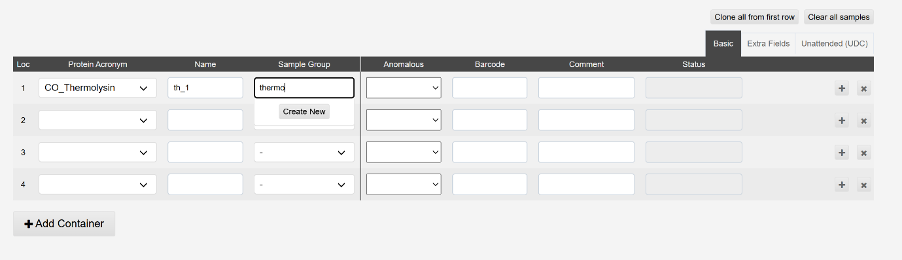
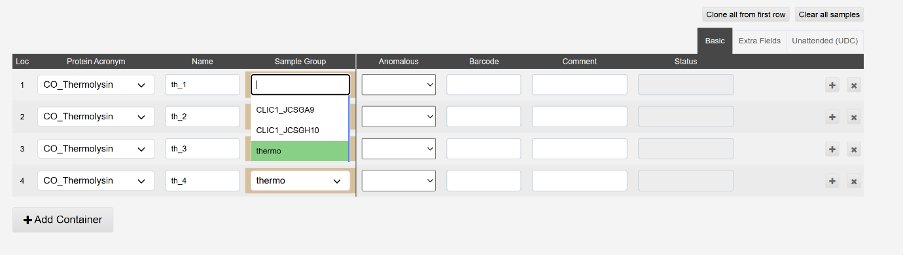
After typing the name, click this button and the new sample group will be created (it may take a few seconds or longer). It will then be available for selection in the drop-down menu. All datasets that you would like merged with xia2.multiplex should be assigned the same sample group at this stage.
In-situ plates (VMXi)
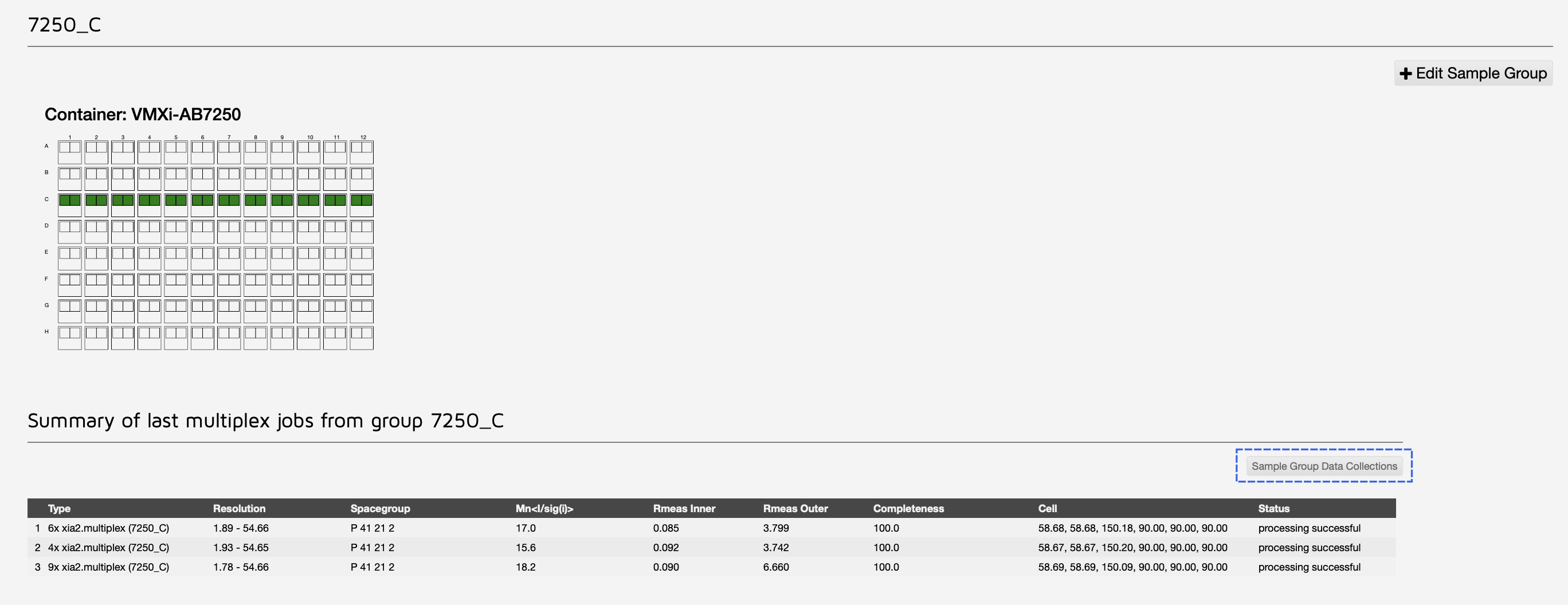
All crystals shot within the same crystallisation drop are automatically added to a sample group. To set up sample groups across multiple drops, go to Proposal->Sample Groups.
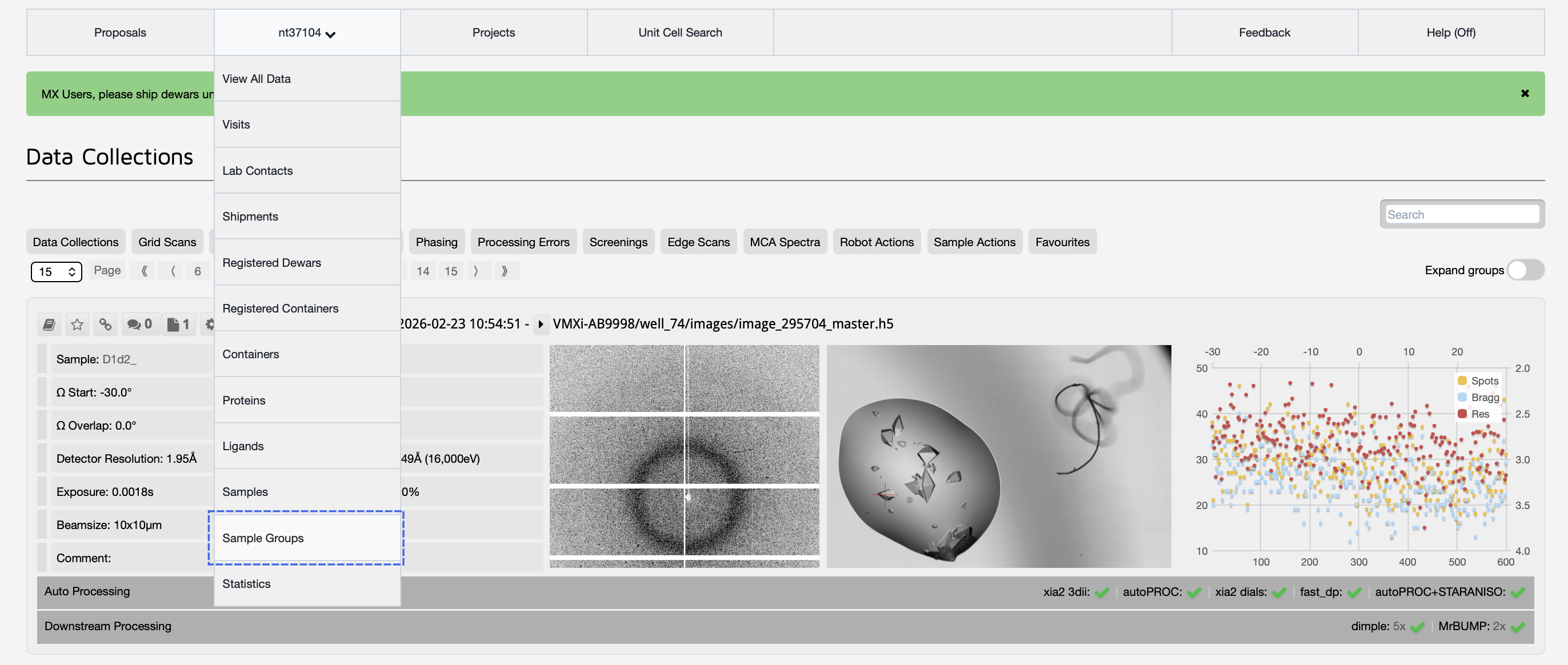
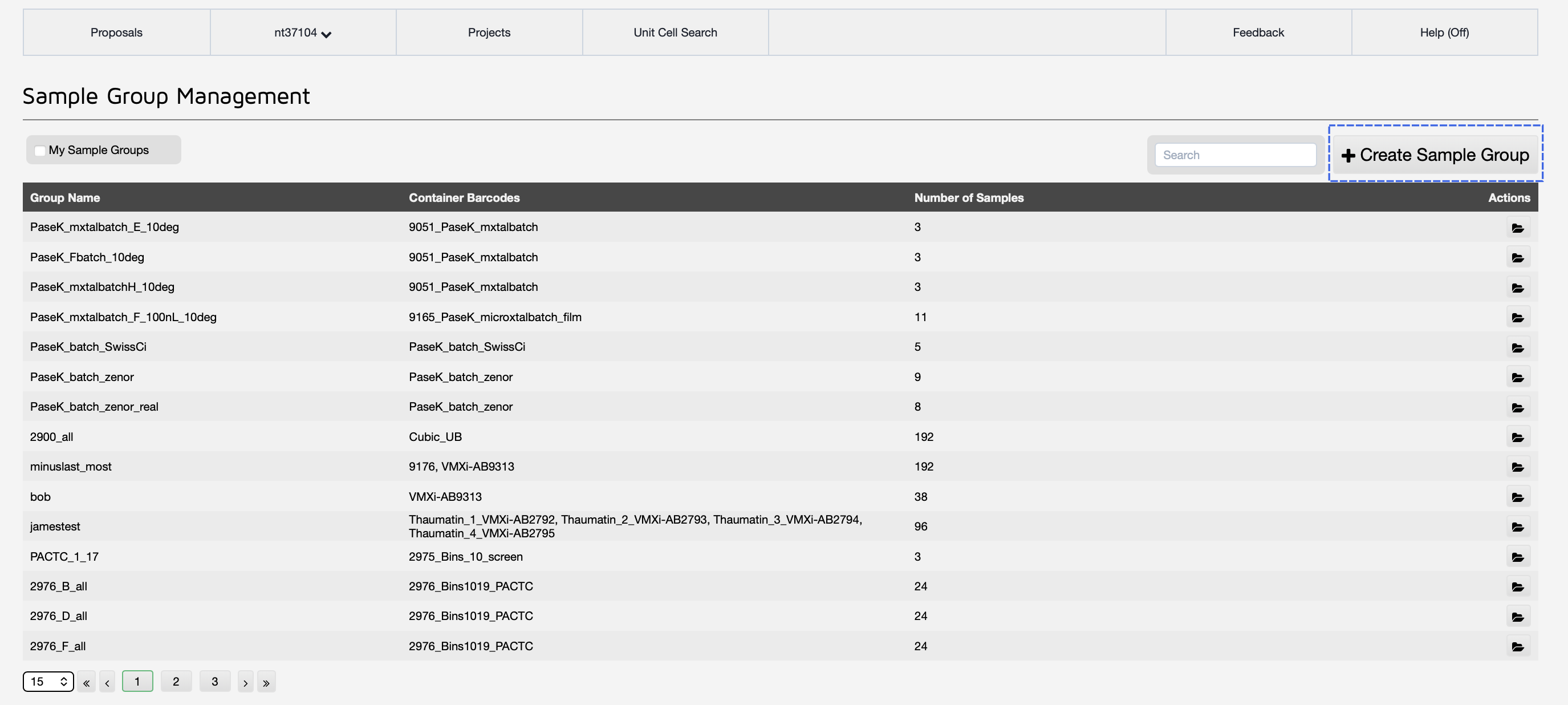
This will bring you to the Sample Groups page, which lists all the current sample groups in the proposal. To make a new sample group, click the 'Create Sample Group' button.
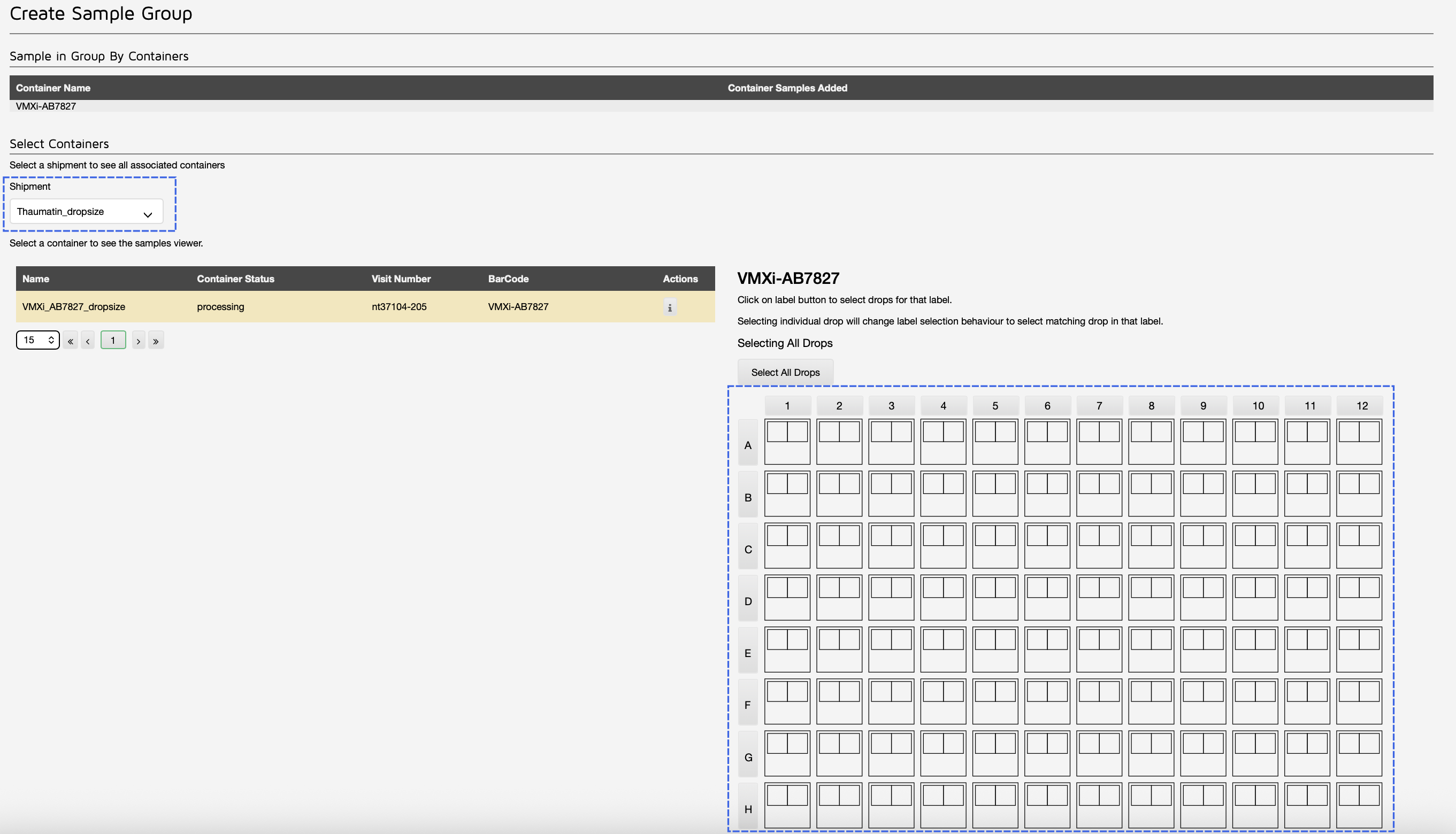
On the sample group creation page, you will need to select your shipment and plate(s). Then, click on all the wells you would like included in the sample group.
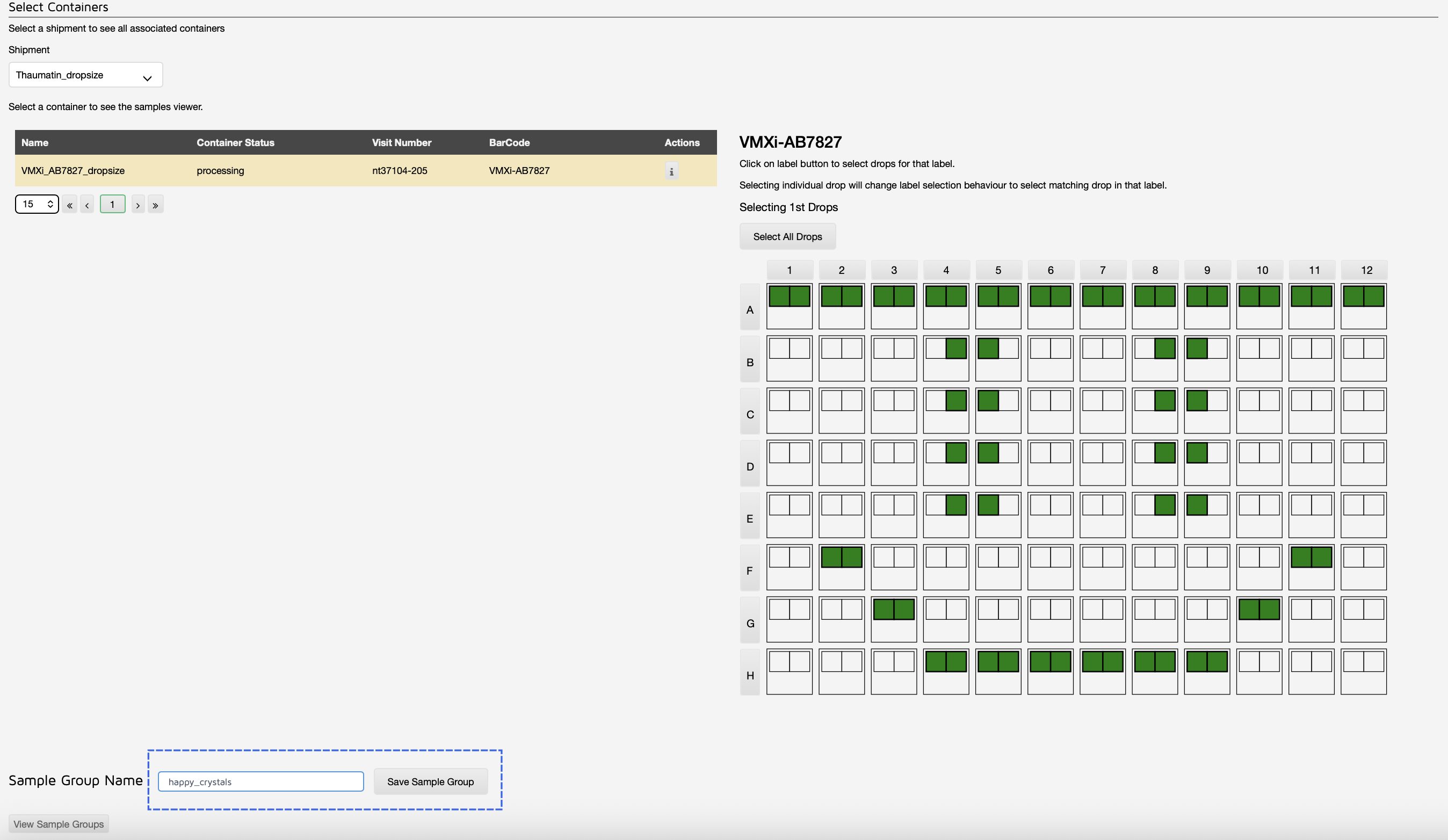
Once you have your wells selected, you need to give your sample group a name and click 'Save Sample Group'.
Now, when crystals from these selected wells are measured, a xia2.multiplex job will be triggered for the final one in the sample group (unless there is a delay in data collection, at which point intermediate jobs may also appear). You can also view the xia2.multiplex results from the Sample Group page. Click on your sample group in the table to display this information. You can also view the individual datasets by clicking on 'Sample Group Data Collections'.
Multiple samples per mount (I24, VMXm)
Beamlines such as VMXm and I24 often have multiple crystals on the same crystal mount (cryoEM grid, thin film, etc). In order to add these crystals to a sample group, go to the Data Collection Settings in GDA. You will need to chose a folder and prefix for your sample. All crystals with the same folder AND prefix will be automatically merged using xia2.multiplex, and there should be only ONE sample per folder. Once you set the prefix, GDA will automatically add a suffix after the name to denote different collections.
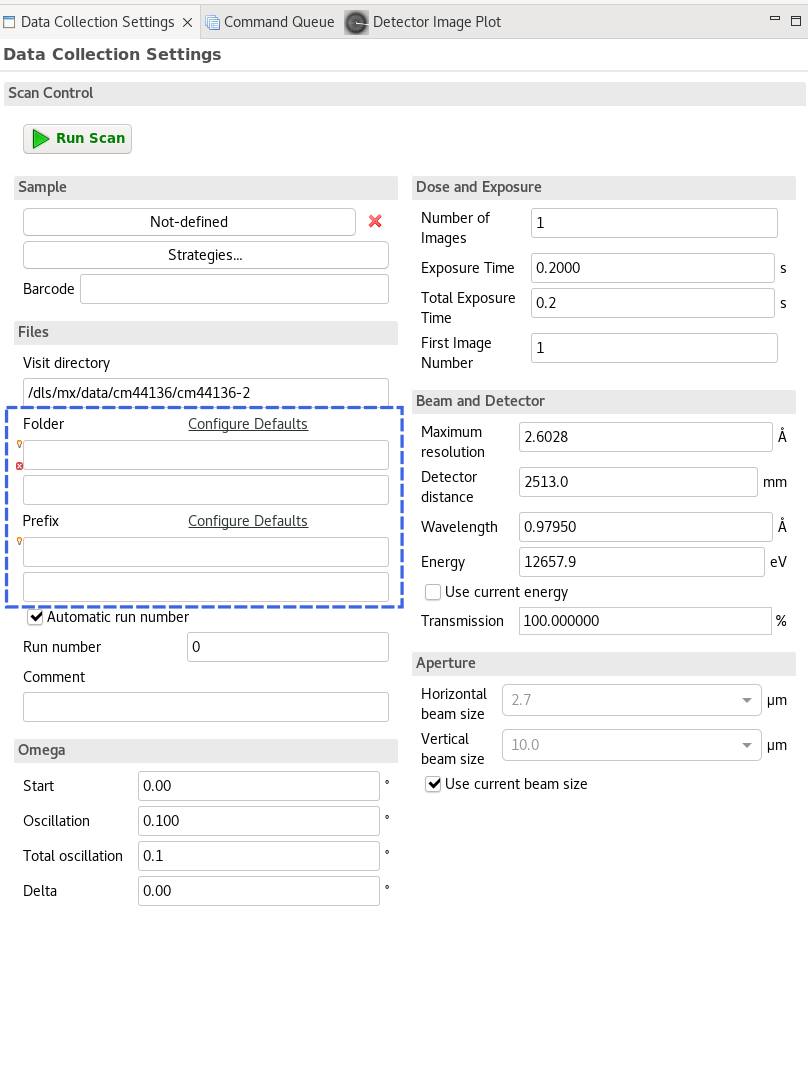
For example, if you wanted to collect and merge different insulin crystals on a grid, you could set folder to 'Insulin', then prefix to 'insulin_grid'. Each data collection would automatically be named:
- insulin_grid_1
- insulin_grid_2
- insulin_grid_3
And so on.
Viewing all datasets included in xia2.multiplex
To view all datasets related to a xia2.multiplex run, click to the auto processing tab, then under xia2.multiplex, select the 'Data Sets' button.
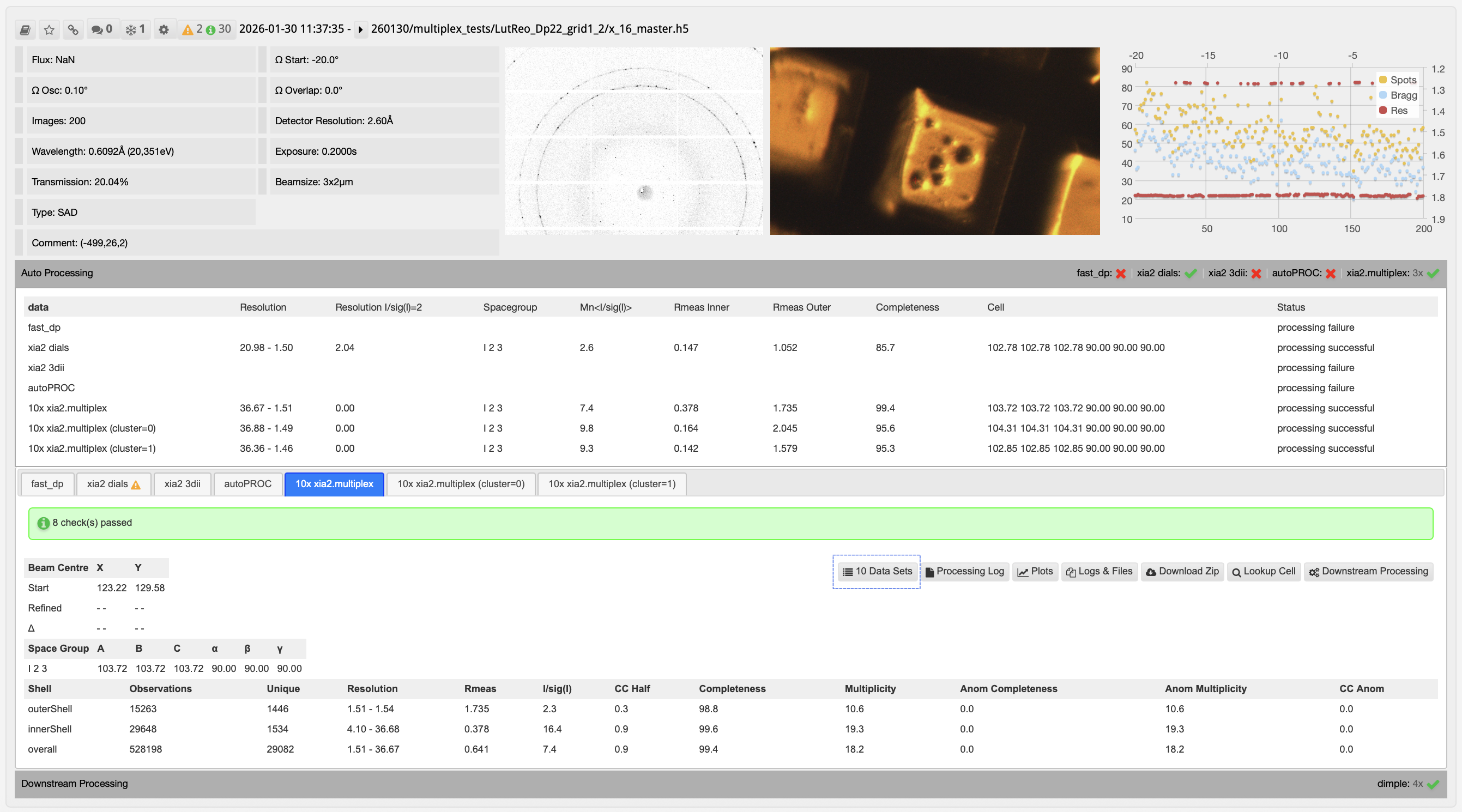
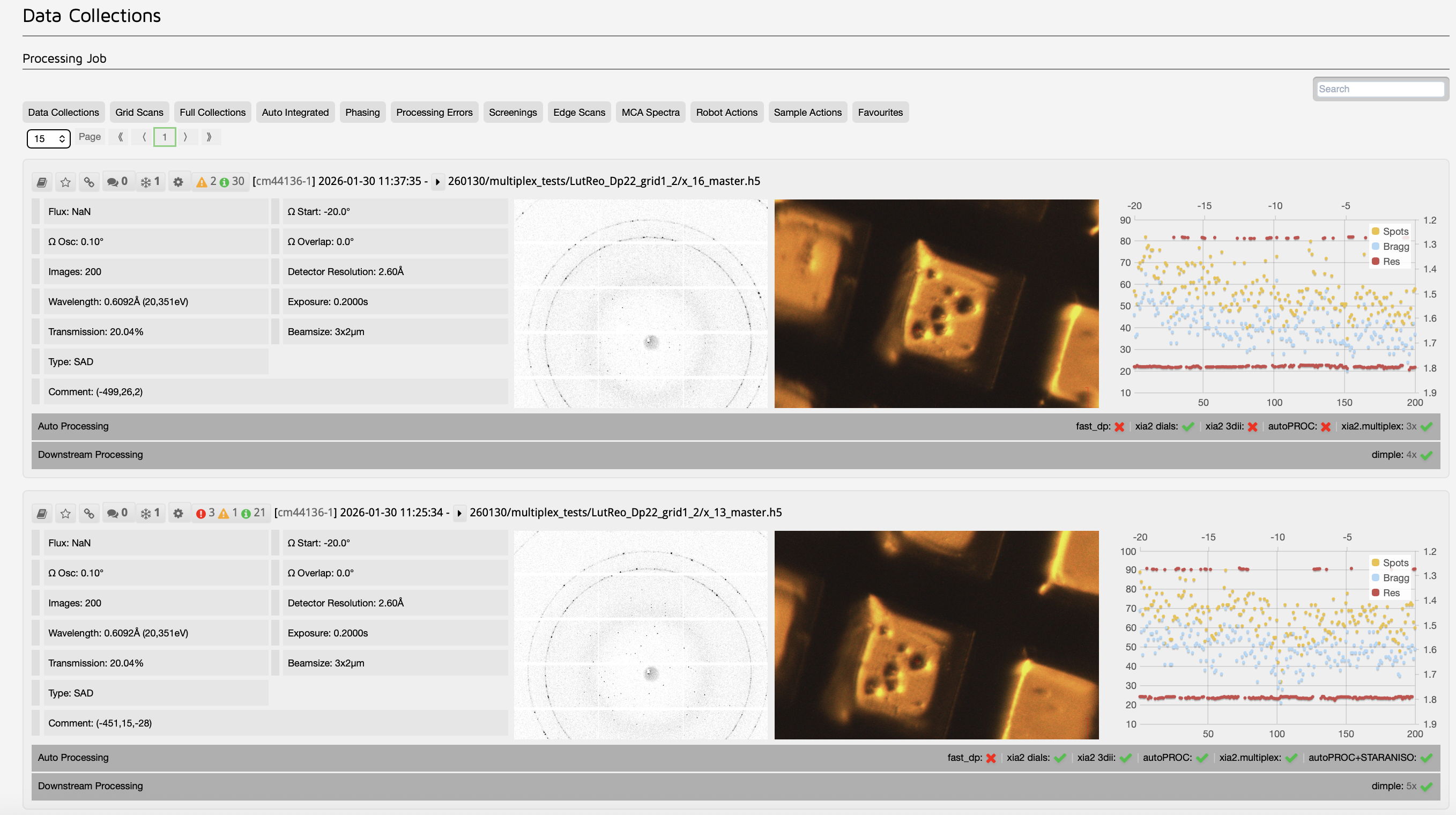
This leads to a subselection of all the datasets involved in that multi-crystal processing job.
xia2.multiplex results
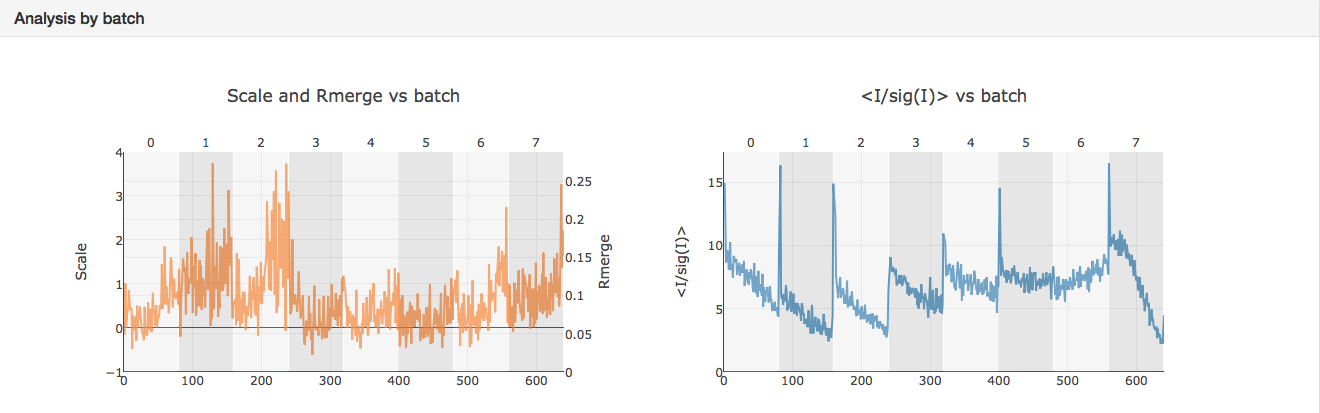
The summary file `xia2.multiplex.html` has a wide variety of useful graphs that are worth looking through, including diagnostic graphs showing how well the different crystals have merged together. This can be seen by inspecting the changes of Rmerge and signal-to-noise ratio varies across the different crystals.
Cluster output to ISPyB
Data processed with xia2.multiplex are also subject to intensity-based clustering. This can remove non-isomorphous outliers from the multi-crystal dataset and identify if there are multiple populations present (for example, apo and ligand bound crystals). For xia2.multiplex jobs run from VMXi, VMXm and I24, if any valid clusters are identified in a dataset, they will be automatically output to ISPyB. Note that the coordinate-based approach is used in the auto-processing pipelines (see the multi-crystal rotation guide for more information on intensity-based clustering).
Below is an example to show how cluster output looks in ISPyB. Here, you can see that there are three tabs in total related to xia2.multiplex with statistic comparisons available. The '10x' out the front indicates that 10 datasets went into the parent xia2.multiplex job. 'cluster=0' and 'cluster=1' on the two additional tabs indicate that two clusters were automatically identified and output by multiplex. In this case, the 10x indicates the number of datasets in the parent job and not in the cluster itself. If there are multiple sample groups present, these will be distinguished by the name of the sample group.
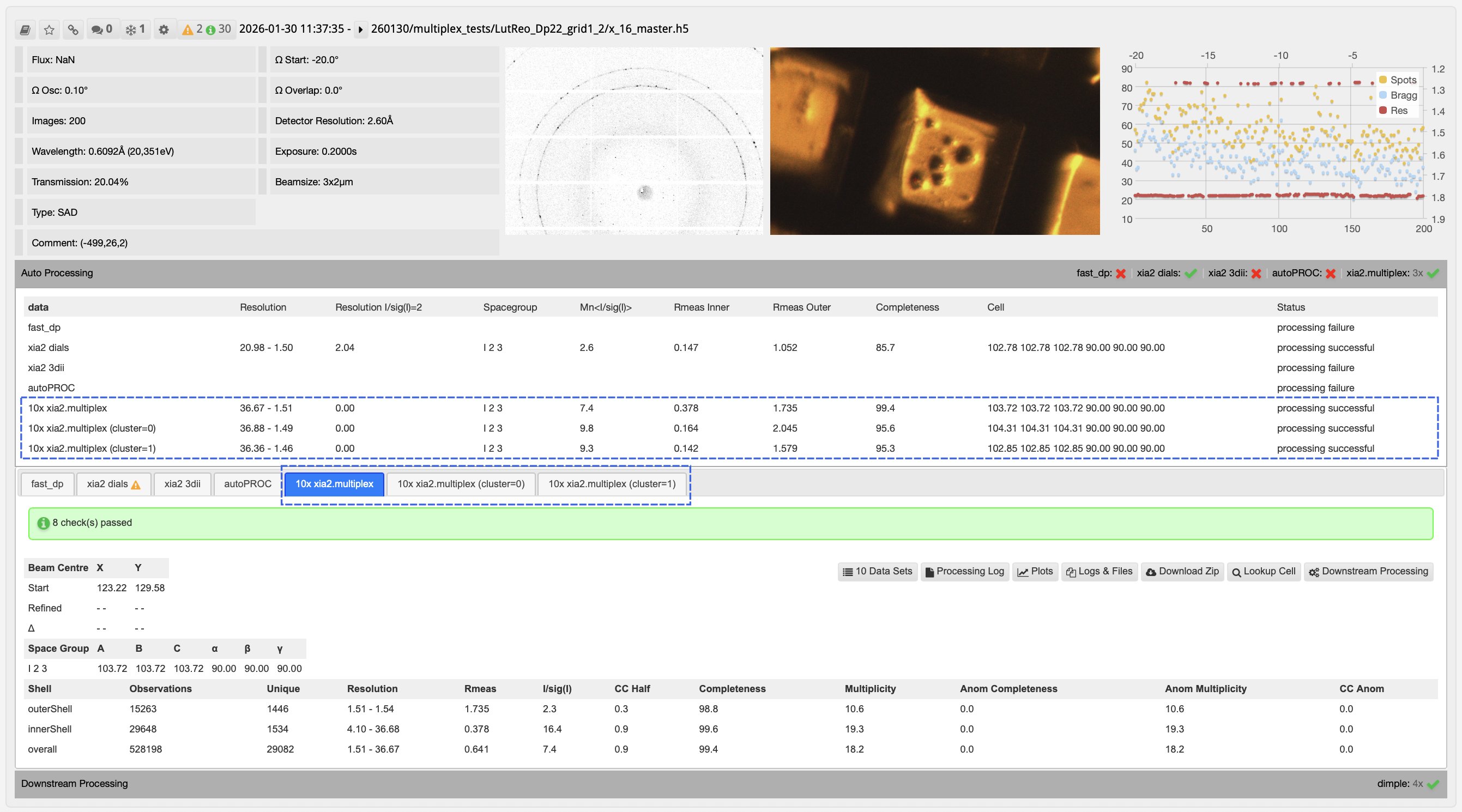
This example also shows some key characteristics to look out for. You will notice that for similar resolution cutoffs, the signal-to-noise ratio for the individual clusters is well improved over the combined dataset. This, as well as the difference in unit cells between the clusters likely indicate the data are systematically different. Each individual cluster is also over 95% complete, so completeness is not compromised significantly by separating the data. From here, the combined multiplex job, as well any separated clusters are sent to downstream pipelines for analysis. This means that clusters can be quickly compared for any structural, or quality differences. To verify which dataset a downstream job corresponds to, click the 'View Upstream' button.
Multi-xia2 vs xia2.multiplex
There are two main pipelines at Diamond for merging multiple sweeps together: multi-xia2 and xia2.multiplex. It is useful here to further distinguish these two pipelies. Multi-xia2 automatically runs when there are multiple data collections on a single crystal (i.e. multiple starting axes, multi-wedged MAD, etc). It feeds the images from all sweeps into xia2 running the desired software (DIALS or XDS). Its workflow is limited to larger sweeps of data for reliable symmetry determination. For multiple different crystals, xia2.multiplex will be triggered if the sample group has been defined. Here, the integrated files from xia2-dials are used as a starting point for xia2.multiplex. Xia2.multiplex will also be triggered for multiple sweeps on the same sample, but only if the preceeding xia2-dials jobs successfully complete.
Citations and Documentation
If your publication uses data processed with the xia2.multiplex pipeline, please cite the following references:
- Gildea, R. J. et al. (2022) Acta Cryst. D78, 752-769
- Winter, Graeme, et al. "DIALS: implementation and evaluation of a new integration package." Biological Crystallography 74.2 (2018): 85-97.
If you deposit a structure in the PDB which is determined from data processed with the xia2-dials pipeline, please make sure both xia2 and DIALS are included in the software category.
The documentation for xia2 can be found here: https://xia2.github.io
The documentation for DIALS can be found here: https://dials.github.io

Diamond Light Source is the UK's national synchrotron science facility, located at the Harwell Science and Innovation Campus in Oxfordshire.
Diamond Light Source Ltd
Diamond House
Harwell Science & Innovation Campus
Didcot
Oxfordshire
OX11 0DE
Copyright © Diamond Light Source. Diamond Light Source® and the Diamond logo are registered trademarks of Diamond Light Source Ltd
Registered in England and Wales at Diamond House, Harwell Science and Innovation Campus, Didcot, Oxfordshire, OX11 0DE, United Kingdom. Company number: 4375679. VAT number: 287 461 957. Economic Operators Registration and Identification (EORI) number: GB287461957003.