Experiment Types
Summary of experiment kinds
| Experiment kind | Protocol | Samples/hr (without screening) | Samples/hr (with screening) |
|---|---|---|---|
| Native | Prioritises completeness/resolution and collects 2 x 360° sweeps, 1st at chi=0 and 2nd at chi=30 | 20 | 15 |
| Phasing | Two 360° sweeps are collected using different chi/phi values at your chosen energy, using a lower transmission to maximise anomalous multiplicity and completeness. | 20 | 15 |
| Ligand | Prioritises speed of data collection and collects a single sweep, 360° dataset | 35 | 25 |
Exposure times, transmission and resolution
The philosophy of UDC is to collect a dataset suited to a particular experimental goal. Exposure settings are tuned to give maximum resolution while avoiding significant radiation damage (the aim is to have final I = 0.85 I0). This avoids the need for manual reprocessing in most cases.
Radiation damage is first observed in the higher resolution shells. We use the choice of diffraction resolution to scale the total dataset exposure to compensate for this. Collections with a high resolution cut off will be collected with shorter exposure times than low resolution. This also avoids underexposing weakly diffracting crystals.
Below is an example plot showing the total exposure times for the UDC Ligand, Native and Phasing recipes that would be collected on I03 at the standard beamline energy (12700eV) with the 100 micron aperture and using 100% transmission. Exposure times and transmission values are adjusted for different energies.
How to determine sample resolution
It is very important for UDC to have a realistic resolution estimate for your sample, as the dose used is determined by the expected resolution.
The best way to proceed with samples where there is no prior information on resolution, or where significant variation is expected, it to use screening. Detailed instructions on this are here.
Screening can be used with any recipe option.
Grouped Data Collections
Synchweb will only show one entry on the main page for the data collection group and the results displayed here will be for the first sweep collected. You can see the results from all sweeps by clicking on the link in the “Group” box to the right (underneath the beamsize).
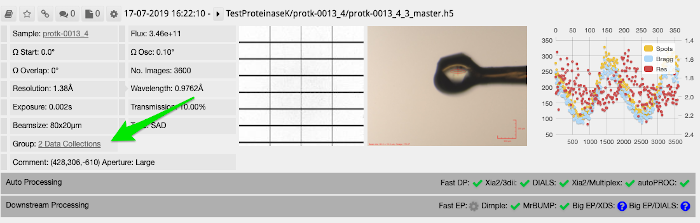
This link will open a page with all sweeps individually listed. From here you can check the processing status and trigger reprocessing in the same way you would from the main page. By default, the automatic pipelines will try and combine whole sweeps, but will not add part of a sweep.
You might find some sweeps refuse to process automatically due to the weakness of the reflections. In this case you will have to process manually and you may find stacking the images for indexing to be of help (MERGE2CBF can be used for this).
