Instruments by Science Group
 Macromolecular
 Soft Condensed
  Imaging and
 Biological
 Magnetic
 Structures and
 Crystallography
  Spectroscopy
 I19 Contact
Beamline Phone Number:
+44 (0) 1235 778418
Principal Beamline Scientist:
Dave Allan
Tel: +44 (0) 1235 778644
E-mail: [email protected]
Science Group Leader
Philip Chater
Email: [email protected]
Tel: +44 (0)1235 778677
I19 Small Molecule Single Crystal Diffraction
Status: Operational
Wavelength: 0.5 - 2.5 Å
Energy: 5 - 25 keV
Energy: 5 - 25 keV
1. OAV (in GDA) camera and/or OAV2 stops updating
Restart the camera IOC.
In EPICS open the EH1 Equipment menu:
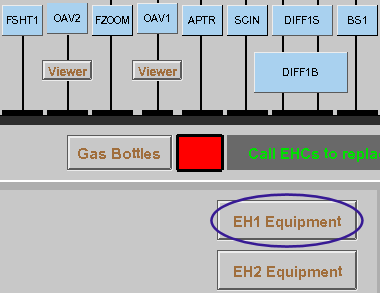
then click on EH1 IOC's to open up the full list of IOCs.
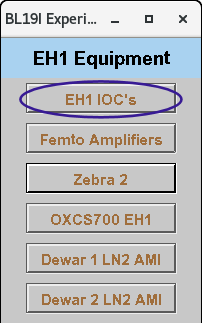
Click on the Start/Stop button for the EH1 GigE Cameras
Then Stop and Restart the camera
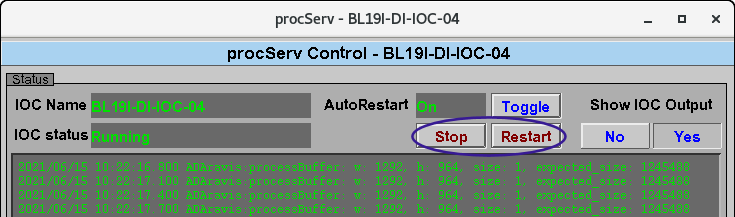
All cameras should restart automatically and, after a few seconds, the OAV View in the GDA should show the live view again.
2. Can not centre the sample
See section 1b of the Robot Help page
3. Drifting of sample stages
This sometimes happens after a sample change as ice can get trapped between the sample and the mount. Wait for a couple of minutes and the drifting should stop once the ice has melted.
If the drifting continues as you try to centre, check that the sample pin is securely glued into the magnetic base.
4. Data collection won't start
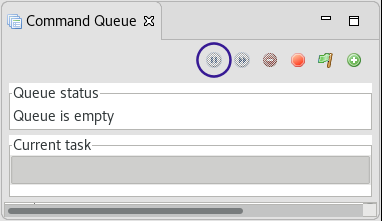
i) Check that the GDA queue is not paused; see bottom right-hand corner of GDA where a paused status will be indicated in red. If it is paused, the pause button in the purple circle is a play button - press the play button in the command queue tab. It is always necessary to restart the queue after a Stop All, and the play button needs to be pressed twice.
ii) Check that you are not trying to write image names that already exist – this will be indicated in the error message that appears in the Jython Console tab
iii) Check the beamstop is mounted correctly - the data collection won’t start if direct beam is detected on the diode - again this should be reported in the Jython Console
iv) Check there is beam in the ring / optics hutch (look at D2) - the data collection won’t start if no beam is detected on the pre-shutter diode - this should be reported in the Jython Console
v) Check that the beamstop check and / or the start position for data collection have reached completion – there are a number of steps which need to be performed and, if any of the motors fail to reach position, the data collecton will fail to start. If this is the case, just restart the data collection again.
NOTE: If the restarted data collection starts from a position where the backlight it out, the crystal snapshots will not be retaken and the snapshots from the aborted collection will not appear in ISPyB – they can be found in the jpegs directory.
vi) Check that the wedge attenuator is not stuck. The wedge is driven as part of the check for beam to ensure the beamstop is in position prior to any data collection performed after the hutch interlock is broken. If the wedge can’t move then this check fails and data collection will not begin. Open the attenuator from EPICS, and check the motor state - it will be red if it is in an error state.
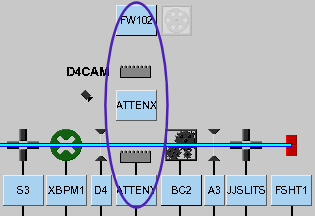
Try to move it to the required value (do not move ATTENY to a value less than 5 or ATTENX to less than 0.1) by typing a number in the box with the blue numbers and pressing Enter. Then restart the data collection.
Last Resort
If nothing seems to fix the problem, restart the GDA - close the client and then restart both the servers and then the client - see starting the GDA
Bear in mind that this will disconnect all users currently using the GDA.
Restarting the GDA may solve data collection related issues, but it is very unlikely to have any effect on the robot.

Diamond Light Source is the UK's national synchrotron science facility, located at the Harwell Science and Innovation Campus in Oxfordshire.
Diamond Light Source Ltd
Diamond House
Harwell Science & Innovation Campus
Didcot
Oxfordshire
OX11 0DE
Copyright © Diamond Light Source. Diamond Light Source® and the Diamond logo are registered trademarks of Diamond Light Source Ltd
Registered in England and Wales at Diamond House, Harwell Science and Innovation Campus, Didcot, Oxfordshire, OX11 0DE, United Kingdom. Company number: 4375679. VAT number: 287 461 957. Economic Operators Registration and Identification (EORI) number: GB287461957003.