Instruments by Science Group
 Macromolecular
 Soft Condensed
  Imaging and
 Biological
 Magnetic
 Structures and
 Crystallography
  Spectroscopy
 I19 Contact
Beamline Phone Number:
+44 (0) 1235 778418
Principal Beamline Scientist:
Dave Allan
Tel: +44 (0) 1235 778644
E-mail: [email protected]
Science Group Leader
Philip Chater
Email: [email protected]
Tel: +44 (0)1235 778677
I19 Small Molecule Single Crystal Diffraction
Status: Operational
Wavelength: 0.5 - 2.5 Å
Energy: 5 - 25 keV
Energy: 5 - 25 keV
GDA Log
To open the GDA, right click on the desktop to open a terminal.
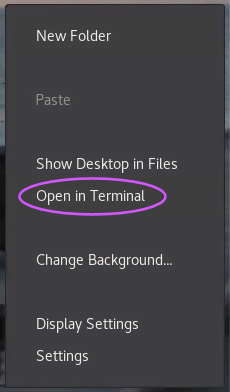
Then, in the terminal window:
Type gdalog1, press enter
This opens a log panel showing details of all GDA processes and is useful to have available, particularly when using the robot, as a lot more details are shown in the log panel than appear in the Jython console of the GDA. Change the log level to DEBUG for maximum output or WARN to just see errors. Actions are only shown in the log if the log panel is open before they happen, so it is a good idea to have it open all the time. It can be minimised if everything is working.
GDA Client
Open a second terminal window:
Type gdaclient1, press enter
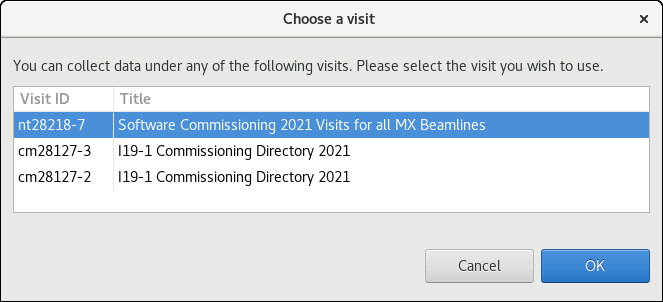
Select the appropriate proposal number, if given a choice, and click OK
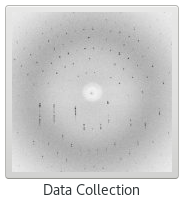
Then click on the Data Collection icon
Occasionally, an old client can become stuck and a new one can’t opened – there will be a pop-up prompt for this suggesting it can be resolved by typing:
gdaclient --reset (minus minus reset without spaces)
Note for EH1 experiments, this needs to be gdaclient1 -- reset
GDA Servers
NOTE: There should be no need to restart the GDA servers as this will have been done by beamline staff when necessary. Restarting the servers will close any clients that are open potentially causing confusion and irritation to colleagues already logged in.
RESTARTING THE SERVERS WILL ALSO ABORT DATA COLLECTIONS WHICH ARE RUNNING SO SHOULD ONLY BE DONE AS A LAST RESORT.
The servers may need to restarted if:
1) The GDA crashes and a restart is deemed sensible to try and clear the fault.
2) A member of the group has left without passing on the baton – restarting the servers closes all clients leaving the baton free for the first person to open a client.
To restart the GDA servers, type gdaservers1 in a terminal and press enter
Wait until the message changes from Server starting to Server started – control of the terminal should be returned once the restart is complete, and then open a client with gdaclient1.
Baton Control
Anyone with the GDA open can see what is happening, but only the active GDA client can control the beamline.
Control is passed by means of holding the baton - the active client is green, whilst inactive versions are red.
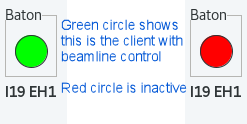
Right click on the circle to bring up the menu.
When switching control either request or take the baton - requesting lets the current user know you are looking to take control. You can only take the baton if you have greater privileges than the current baton holder (normally this would be staff) or there is no current holder.
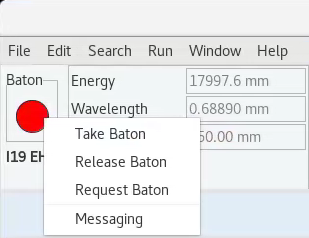
When you have finished running, release the baton to make things easier for the rest of the team.
Messaging brings up a new tab which can used for group conversations and interaction with the local contact - the local contact will also have a version of the GDA running and will be checking periodically for messages and errors.
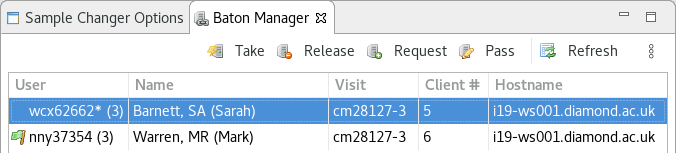
The Baton Manager tab shows which users are currently connected to the session. It also shows who the users are, as people are only identified by their FedID in the Messages window. The flag indicates who currently holds the baton.

Diamond Light Source is the UK's national synchrotron science facility, located at the Harwell Science and Innovation Campus in Oxfordshire.
Diamond Light Source Ltd
Diamond House
Harwell Science & Innovation Campus
Didcot
Oxfordshire
OX11 0DE
Copyright © Diamond Light Source. Diamond Light Source® and the Diamond logo are registered trademarks of Diamond Light Source Ltd
Registered in England and Wales at Diamond House, Harwell Science and Innovation Campus, Didcot, Oxfordshire, OX11 0DE, United Kingdom. Company number: 4375679. VAT number: 287 461 957. Economic Operators Registration and Identification (EORI) number: GB287461957003.